Pincatch - Pinterest Video Downloader
Download Pinterest videos, images, and GIFs instantly in HD, Full HD, 1080p, 2K, and 4K quality. Our browser-based downloader works on any device, no app required, completely free to use.
Please enter a valid Pinterest URL
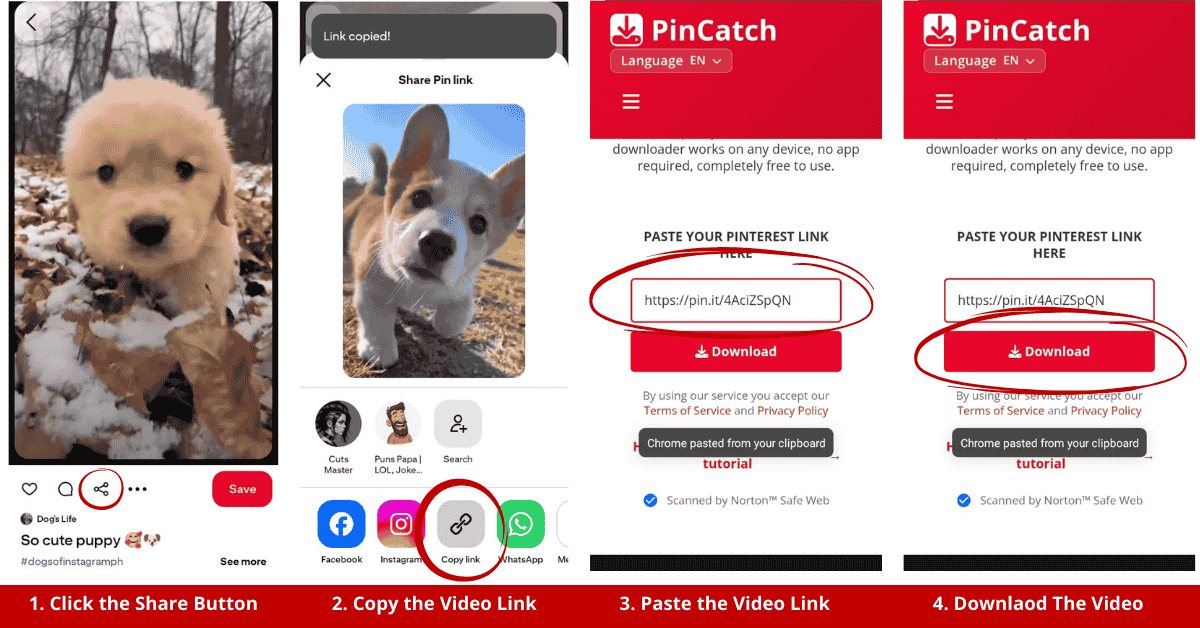
How to Download Pinterest Content
Three simple steps to save any Pinterest video, image, or GIF to your device.
Copy the Link
Find the Pinterest pin you want to download and copy its URL from the browser or app.
Paste the URL
Paste the copied Pinterest link into the download box above on PinCatch.
Download & Save
Click Download and save the content to your device in your preferred quality.
Everything You Need to Download from Pinterest
Download any type of Pinterest content in the highest quality available.
Video Downloader
Download Pinterest videos in MP4 format with HD, Full HD, 2K, and 4K quality options.
Try it nowImage Downloader
Save Pinterest images in full resolution. Get the original quality with no compression.
Try it nowGIF Downloader
Download animated GIFs from Pinterest in their original quality and frame rate.
Try it nowProfile Picture Downloader
Download Pinterest profile pictures in full resolution. Save any user's profile photo instantly.
Try it nowURL Downloader
Paste any Pinterest URL to download its content. Supports pins, boards, and shared links.
Try it nowMp4 Downloader
Download Pinterest videos directly as MP4 files in the highest quality available, up to 4K resolution.
Try it nowAudio Extractor
Extract audio from Pinterest videos and save them as high-quality MP3 files.
Try it nowStory Pin Downloader
Save Pinterest Story Pins before they disappear. Keep the content you love forever.
Try it nowBatch Download
Download multiple Pinterest pins at once. Save entire boards quickly and efficiently.
Try it nowThe Fastest & Easiest Pinterest Downloader
Everything you need to save Pinterest content, fast, free, and without limits.
What is the best way to download Pinterest videos on iPhone?
Using PinCatch on iOS is super simple and works perfectly on Safari or any browser. Here's how: Open Pinterest on your iPhone and find the video you want. Tap the three dots and select 'Copy Link.' Then open Safari, visit PinCatch, paste the URL in the field, and tap download. Your video will save directly to your Photos app in full HD quality with sound included. No app required; just your browser and a few taps.
What are the Benefits of Using Pinterest Video Downloader Online?
Discover why millions of users trust PinCatch for their Pinterest downloads.
All-in-One Tool
Download videos, images, GIFs, and audio from Pinterest all in one place. No need to switch between multiple tools or websites.
High-Quality Downloads
Save Pinterest content in the highest resolution available including HD, Full HD, 1080p, 2K, and 4K quality without any compression.
Works on Any Device
Our browser-based downloader works seamlessly on desktop, tablet, and mobile. No app installation required, just paste and download.
Safe and Private
Your privacy matters. We don't store your data, require login, or track your downloads. Everything happens securely in your browser.
No Watermark
Download clean, watermark-free content exactly as the original creator uploaded it. Get pristine files every single time.
Multi-Format Support
Save content in your preferred format. MP4 for videos, JPG/PNG for images, GIF for animations, and MP3 for audio extraction.
Loved by Creators Worldwide
Join thousands of happy users who trust PinCatch for their Pinterest downloads.
PinCatch is my go-to tool for saving design inspiration from Pinterest. The image quality is amazing and it works instantly every time.
I manage multiple social media accounts and PinCatch saves me hours every week. The batch download feature is a game changer!
As a student, I use Pinterest for research and references. PinCatch makes it so easy to save high-quality images for my projects.
I create content for my YouTube channel and PinCatch helps me repurpose Pinterest videos. The 4K quality is perfect for my workflow.
Finally a Pinterest downloader that actually works on my iPhone! No app needed, just paste the link and download. Brilliant!
As a photographer, I use Pinterest to discover trends and collect references. PinCatch lets me save everything in original quality effortlessly.
Frequently Asked Questions
Everything you need to know about using PinCatch.